
Never available again
View alternatives in the sidebar
Sharpness | Quad HD (1440p) | |
|---|---|---|
Curved | ||
Aspect ratio | Standard (16:9) | |
Refresh rate | 180 Hz | |
Response time | 1 ms | |
Panel type | IPS panel | |
Color depth | Less than 17 million colors (less than 8-bit) | |
Built-in speakers |
According to our monitor expert
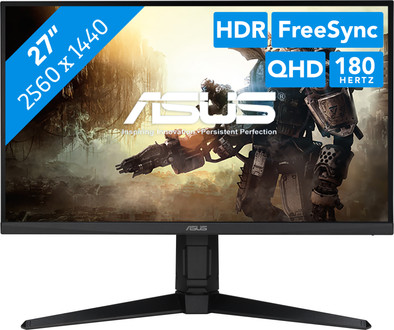
You can enjoy sharp images and colors thanks to the QHD screen with HDR support.
With a low response time and high refresh rate, movements and transitions look smooth.
Your monitor and video card work together smoothly thanks to the FreeSync Premium support.
You have to connect the monitor via DisplayPort to reach the maximum 180Hz refresh rate in resolution.
Game at a high level with the ASUS VG27AQ3A 27-inch QHD gaming monitor. This monitor has a 180Hz refresh rate. and a 1ms response time. This way, you can game with smooth images without screen tearing. In addition, the VG27AQ3A has Variable Overdrive technology. As a result, you won't be bothered by ghosting or motion blurring. Thanks to the IPS panel, you can experience lifelike colors from every viewing angle. This is useful if you game with multiple people on the monitor. The screen also has HDR10 support. This provides a wider color representation and higher color contrasts. Do you have an NVIDIA or AMD video card? The FreeSync Premium of G-Sync Compatible matches the frames per second of your video card with the monitor's refresh rate. You can also tilt or turn the monitor. As a result, you won't be bothered by reflecting images due to sunlight. Thanks to the built-in speakers, you can enjoy the best soundtracks while you game.
Note: the maximum refresh rate via HDMI is 144Hz, for 240Hz gaming you need to connect the monitor via DisplayPort.
5 stars
8
4 stars
1
3 stars
1
2 stars
1
1 star
0
Installation ease
Image quality
Price-quality ratio
Design
I'd been looking for a new, high-quality monitor for my gaming PC for a while, one that also supported DisplayPort over USB-C, so I could use it as a work monitor with my MacBook Pro (and while charging).
Image quality: I've had an LG OLED TV for years and would never go back to an LCD. This monitor features a 4K OLED display with a 240Hz refresh rate (also via USB-C from my MacBook Pro). Blacks are truly black with this OLED. The screen is truly glossy. My monitor is used in the living room, which has large south-facing windows, and the reflections are better than I originally expected. In the evening, the screen is even more vibrant with super-bright colors. The 178-degree viewing angle is also perfect.
KVM switch: I connected my keyboard, mouse, and speakers directly to the display. A USB cable, along with a DisplayPort cable, runs from the monitor to my PC, and a USB-C cable to my MacBook Pro. You can enable automatic KVM functionality in the settings. When the USB-C input is selected, everything seamlessly transfers to my MacBook Pro, and vice versa when I want to work on my PC.
OLED features: The monitor has several built-in features to protect the OLED panel from image burn-in. These include screen shifting, logo detection, and taskbar detection to regularly shift/refresh these pixels (I didn't notice anything myself, even though I had all these features enabled). There's also a built-in proximity sensor with an adjustable distance. So, if you leave the set distance or stop moving, the screen automatically turns off after the set period. When you return to your seat, the screen automatically turns back on. I still need to experiment with this a bit, as I've noticed my screen turning off several times while working if I don't move enough.
Display stand: There's a stand for your smartphone, for example (iPhone 16 Pro with a case fits). There's an opening in the stand to route cables, but the downside is that they're too visible. The connections are also on the bottom, making it a bit harder to conceal the cables. This can be solved by using a angled cable/connector or by bundling the cables more tightly towards the back. The stand can also be replaced with the included VESA mount.
Subtle RGB: When the monitor is on, you see a subtle RGB glow on the back of the monitor, reflecting off the wall.
Conclusion: After much comparison, I'm happy I chose this monitor. The added value for me was the DisplayPort over USB-C with 90W PD, as it allows me to connect my MacBook Pro with a single cable. Not many OLED displays support this. Personally, I'm not so impressed with the design. It's really geared towards gamers, but I would have preferred a more neutral design.
Gunther
21 August 2025
Automatically translated from Dutch
Despite the beautiful design, returned due to the inferior quality of numbers/letters and photos. Despite the many settings, I was unable to adjust the picture as well as on my old M**.
J C
3 May 2026
Automatically translated from Dutch
With a USB-C cable, a MacBook Pro connects to the monitor while being charged. I can get rid of the power cable from my desktop.
mogita
26 March 2026
Product number | 957105 | |
|---|---|---|
Manufacturer code | 90LM0940-B01970 | |
Brand | ASUS | |
Warranty | 3 years | |
Processing of your defect | Via Coolblue |
Screen size monitor | Large (27 - 29 inches) | |
|---|---|---|
Recommended display resolution | 2560x1440 | |
Sharpness | Quad HD (1440p) | |
Aspect ratio | Standard (16:9) | |
Refresh rate | 180 Hz | |
Response time | 1 ms | |
Panel type | IPS panel | |
Brightness | 250 cd/m2 | |
Local dimming | ||
HDR support | ||
Contrast ratio | 1000 | |
Touchscreen | ||
Type of HDR | HDR10 | |
Screen reflection | Anti-glare | |
Blue light filter | ||
Flicker-free technology | ||
Color space | sRGB | |
sRGB color coverage percentage | 130 % | |
Color depth | Less than 17 million colors (less than 8-bit) | |
Adaptive Sync | ||
Type of adaptive sync | FreeSync Premium, G-Sync Compatible | |
Resolution width | 2560 pixels | |
Resolution height | 1440 pixels | |
Anti-reflection type | Anti glare | |
Horizontal viewing angle | 178 ° |
Height | 45,5 cm | |
|---|---|---|
Width | 61,5 cm | |
Depth | 21,4 cm | |
Weight | 4,6 kg | |
Color | Black | |
Including stand | ||
Material | Plastic | |
Cable management | ||
Appearance | Gaming | |
Curved |
Number of HDMI connectors | 2 | |
|---|---|---|
Number of Female HDMI type A 2.0 ports | 2 | |
Number of headphone jacks | 1 | |
Type of headphone connection | 3.5mm (TRS) | |
Number of Female Standard DisplayPort 1.4 ports | 1 | |
Number of female 3.5mm TRS Audio Jack ports | 1 | |
Suitable for daisy chaining | ||
USB-C dock |
Included by default | DisplayPort cable | |
|---|---|---|
Not included by default | HDMI cable, USB-C cable |
Adjustable in height | ||
|---|---|---|
Tiltable | ||
Pivotable stand | ||
Pivot function | ||
VESA mount option | ||
VESA mount | 100x100mm |
Energy label | F | |
|---|---|---|
Energy consumption standby | 0,5 W | |
Energy consumption active | 26 W | |
Energy consumption per 1000h | 26 kWh | |
Annual energy consumption | 37,96 kWh | |
Annual energy costs | 15,18 euros |
Built-in speakers | ||
|---|---|---|
Sound system | Stereo | |
Webcam | ||
Split screen | ||
Kensington lock |
Recommended for use | Gaming, Image editing and graphic design, Internet, email, and text processing, Watching movies in Full HD |
|---|

Receive more coverage in case of damage than with your standard warranty. Coolblue takes care of everything: from taking out the insurance to repairs. Is a repair not possible? You receive the purchase price as CoolblueCredit.
XCover is allowed to arrange and process insurances on behalf of the insurer. The insurances are governed by Belgium law. If you have a complaint, you can contact the or our customer service.
First, add your monitor to your shopping cart. On the next page, choose the Protection Plan below. You always have a 30-day return window and pay no deductible in case of damage.
The insurance can be canceled every year, even if you have paid in advance. If you cancel earlier, you will receive a refund for the overpaid amount.