Never available again
View alternatives in the sidebar
View alternatives in the sidebar
Product number | 958103 | |
|---|---|---|
Manufacturer code | UM.XP3EE.E01 | |
Brand | Acer | |
Warranty | 2 years | |
Processing of your defect | Via Coolblue |
Screen size | 18,5 inches | |
|---|---|---|
Recommended display resolution | 1920x1080 | |
Sharpness | Full HD (1080p) | |
Aspect ratio | Standard (16:9) | |
Refresh rate | 100 Hz | |
Response time | 8 ms | |
Panel type | IPS panel | |
Brightness | 250 cd/m2 | |
Local dimming | ||
HDR support | ||
Contrast ratio | 1000 | |
Touchscreen | ||
Screen reflection | Anti-glare | |
Blue light filter | ||
Color depth | Less than 17 million colors (less than 8-bit) | |
Adaptive Sync | ||
Resolution width | 1920 pixels | |
Resolution height | 1080 pixels | |
Anti-reflection type | Anti glare | |
Horizontal viewing angle | 178 ° |
Height | 25,6 cm | |
|---|---|---|
Width | 42,3 cm | |
Depth | 24,5 cm | |
Weight | 2,33 kg | |
Color | Black | |
Including stand | ||
Material | Plastic | |
Cable management | ||
Appearance | Business, Neutral | |
Curved |
Number of HDMI connectors | 1 | |
|---|---|---|
Number of Female HDMI Type C 1.4 ports | 1 | |
Number of headphone jacks | 1 | |
Number of USB-C ports | 2 | |
Type of USB port | USB-C | |
Number of USB ports | 2 | |
Suitable for daisy chaining | ||
USB-C dock |
Included by default | HDMI cable, USB-C cable |
|---|
Adjustable in height | ||
|---|---|---|
Tiltable | ||
Pivotable stand | ||
Pivot function | ||
VESA mount option | ||
VESA mount | 100x100mm |
Energy label | E | |
|---|---|---|
Energy consumption standby | 0,5 W | |
Energy consumption active | 35 W | |
Energy consumption per 1000h | 20,4 kWh | |
Annual energy consumption | 178,7 kWh | |
Annual energy costs | 71,48 euros |
Built-in speakers | ||
|---|---|---|
Sound system | Stereo | |
Webcam | ||
Split screen | ||
Kensington lock | ||
Best tested |
Recommended for use | Internet, email, and text processing, Office work, On the go, Watching movies in Full HD |
|---|
anything for a smile
Our digital expert will help you, but it can sometimes make mistakes, like humans do.
According to our monitor expert
Sharp on a small screen: texts, photos, and videos look sharp on this small screen thanks to the Full HD resolution.
Fewer cables on your desk: you can connect peripherals to the built-in USB-C port and save space.
Easy to take with you: the small size lets you take the screen anywhere.
Limited screen space: you have limited screen space because of the small size.
No touchscreen: the monitor doesn't have a touchscreen, so you can't quickly control it with your fingers.
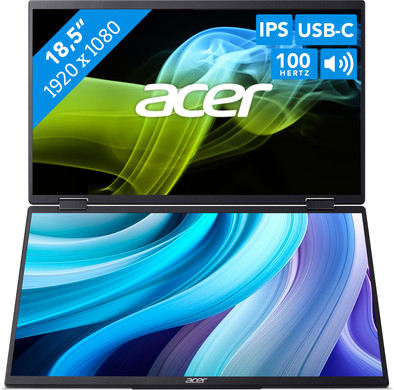
Technically you have 1 extra screen, but if you arrange it properly, you actually have 3 screens at your disposal with your laptop screen.
Gert-Jan
13 January 2025
Automatically translated from Nederlands
Nice screen to use alongside your laptop. The build quality is surprisingly good. I expected the frame to be plastic, but it looks like aluminum.
The only downside is that the included USB-C cable only supplies power. However, to use the screens separately and not as one large screen, a USB-C cable capable of providing DP is required.
Thom
3 April 2026
Automatically translated from Nederlands
Great screen size. Just like a laptop, it's quick to tidy up!
CSY
22 July 2025
Automatically translated from Nederlands