Iiyama G-Master GCB3484WQSU-B1
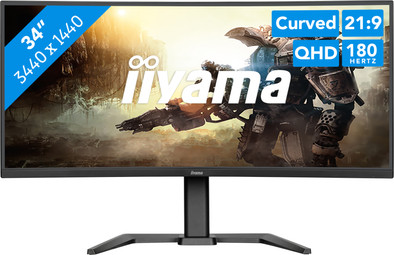
Never available again
View alternatives in the sidebar
View alternatives in the sidebar
Product number | 964410 | |
|---|---|---|
Manufacturer code | GCB3484WQSU-B1 | |
Brand | Iiyama | |
Warranty | 3 years | |
Processing of your defect | At your home |
Screen size | 34 inches | |
|---|---|---|
Recommended display resolution | 3440x1440 | |
Sharpness | Quad HD (1440p) | |
Aspect ratio | Ultrawide (21:9) | |
Refresh rate | 180 Hz | |
Response time | 0,4 ms | |
Panel type | VA panel | |
Brightness | 500 cd/m2 | |
Local dimming | ||
HDR support | ||
Contrast ratio | 4000 | |
Touchscreen | ||
Type of HDR | DisplayHDR 400 | |
Screen reflection | Anti-glare | |
Blue light filter | ||
Flicker-free technology | ||
Color space | sRGB | |
sRGB color coverage percentage | 99 % | |
Color depth | Less than 17 million colors (less than 8-bit) | |
Adaptive Sync | ||
Type of adaptive sync | FreeSync Premium | |
Resolution width | 3440 pixels | |
Resolution height | 1440 pixels | |
Anti-reflection type | Anti glare | |
Horizontal viewing angle | 178 ° |
Height | 43,3 cm | |
|---|---|---|
Width | 80,8 cm | |
Depth | 29 cm | |
Weight | 8,5 kg | |
Color | Black | |
Including stand | ||
Material | Metal, Plastic | |
Cable management | ||
Appearance | Gaming | |
Curved | ||
Screen curve | 1500 R |
Number of HDMI connectors | 2 | |
|---|---|---|
Number of Female HDMI type A 2.0b connectors | 2 | |
Number of headphone jacks | 1 | |
Type of headphone connection | 3.5mm (TRS) | |
Number of USB-C ports | 2 | |
Number of USB 3.0 Female USB-C ports | 1 | |
Number of Female Standard DisplayPort 1.4 ports | 1 | |
Number of female standard USB-A ports | 2 | |
Female standard USB-A port version | 3.0 | |
Number of female 3.5mm TRS Audio Jack ports | 1 | |
Number of female standard USB-B (3.0 form) ports | 1 | |
Type of USB port | Standard USB-A, Standard USB-B (3.0 form), USB-C | |
Number of USB ports | 5 | |
Suitable for daisy chaining | ||
Type of USB cable included | USB-A to USB-B | |
USB-C dock | ||
Maximum USB-C dock power | 7,5 W |
Included by default | DisplayPort cable, HDMI cable, USB cable | |
|---|---|---|
Not included by default | USB-C cable |
Adjustable in height | ||
|---|---|---|
Tiltable | ||
Pivotable stand | ||
Pivot function | ||
VESA mount option | ||
VESA mount | 100x100mm |
Energy label | F | |
|---|---|---|
Energy consumption standby | 0,5 W | |
Energy consumption active | 60 W | |
Energy consumption per 1000h | 32 kWh | |
Annual energy consumption | 46,72 kWh | |
Annual energy costs | 18,69 euros |
Built-in speakers | ||
|---|---|---|
Sound system | Stereo | |
Webcam | ||
Split screen | ||
Kensington lock |
Recommended for use | Gaming, Image editing and graphic design, Internet, email, and text processing, Watching movies in Full HD |
|---|
anything for a smile
Our digital expert will help you, but it can sometimes make mistakes, like humans do.
According to our monitor expert
Sharp image: you can clearly see small details on the screen thanks to the Quad HD resolution.
More overview: you can see more of your game and open multiple windows side by side thanks to the ultrawide format.
Play smoothly: you can see fast action smoothly on screen thanks to the 180Hz refresh rate.
Not for consoles: ultrawide monitors don't support consoles, so you'll see black bars on the sides of the screen.
DisplayPort required: you'll need a DisplayPort cable for 180 hertz, because you can't get that refresh rate via HDMI.
After a week of use and testing, no dead pixels found yet... otherwise a very nice image... played DCS flight simulator in high resolution, sublime... good to know that the highest resolution is only achieved with DisplayPort
Cesar
16 September 2025
Automatically translated from Nederlands
I immediately mounted it on an existing wall bracket. So I have no experience with the stand. Great screen, nice and sharp and fast. Great device.
J. Homan
6 August 2026
Automatically translated from Nederlands