Acer Predator X34A
Never available again
View alternatives in the sidebar
View alternatives in the sidebar
Curved | ||
|---|---|---|
Refresh rate | 100 Hz | |
Response time | 4 ms | |
Panel type | IPS panel | |
Color depth | 1 billion colors (10-bit) | |
Built-in speakers | ||
Adjustable in height |
According to our monitor expert
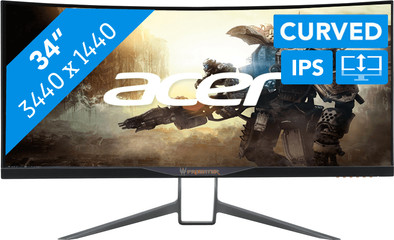
Immerse yourself in your favorite game with the Acer Predator X34A. This ultrawide monitor has a curved design, which gives a panoramic effect to your epic killstreak in Doom. You won't see any image stutter, as G-Sync technology ensures smooth gameplay. This screen has a standard refresh rate of 60 frames per second, but you can boost this to 100 frames per second by means of overclocking. This will make the gameplay look even smoother. Even in shooters like Battlefield 1. Ergonomic aspects were also considered: this Acer Predator is tiltable and height adjustable, ensuring good posture.
5 stars
6
4 stars
4
3 stars
0
2 stars
0
1 star
0
I doubted for a long time whether I would buy this screen. Finally did it and never regretted it. It's a high price, but a screen is an underrated important part of a gaming setup. The only one with 3440x1440 ips with 100hz refresh rate. Hots, eve online, rise of the tomb raider, skyrim with lots of graphic mods, all great to play thanks to the 21:9 curved image. I come from a standard 24" screen and never expected that the impact would be so big. Web browsing is no problem for me either. Keep in mind that the foot takes up a lot of space. Also check whether you have the X34A, the x34 has a lot of bad points that have been remedied with the x34A.
Dimitri Torfs
9 December 2017
Automatically translated from Dutch
The monitor is already excellently set up and mounted out of the box. Excellent image and not too striking design. This aspect ratio is very good for both work and games and gives it a whole new dimension. Only downside is that the settings buttons are hidden below the screen. As a result, you sometimes choose the wrong button. Highly recommended.
P.P. Geluk
4 January 2018
Automatically translated from Dutch
Gaming and working on a 21:9 is a whole new experience, the colors are beautiful and vibrant. 110 dpi is the ideal density. The only downside is that the blb can be quite intense, personally I don't mind this at all. Only stands out with completely black screens or scenes
Simon De Spiegeleer
21 July 2017
Automatically translated from Dutch
Receive more coverage in case of damage than with your standard warranty. Coolblue takes care of everything: from taking out the insurance to repairs. Is a repair not possible? You receive the purchase price as CoolblueCredit.
XCover is allowed to arrange and process insurances on behalf of the insurer. The insurances are governed by Belgium law. If you have a complaint, you can contact the or our customer service.
First, add your monitor to your shopping cart. On the next page, choose the Protection Plan below. You always have a 30-day return window and pay no deductible in case of damage.
The insurance can be canceled every year, even if you have paid in advance. If you cancel earlier, you will receive a refund for the overpaid amount.
Product number | 719411 | |
|---|---|---|
Manufacturer code | UM.CX0EE.A01 | |
Brand | Acer | |
Warranty | 2 years | |
Processing of your defect | Carry-in warranty |
Refresh rate | 100 Hz | |
|---|---|---|
Response time | 4 ms | |
Panel type | IPS panel | |
Brightness | 300 cd/m2 | |
Local dimming | ||
HDR support | ||
Contrast ratio | 1000 | |
Touchscreen | ||
Screen reflection | Glossy | |
Blue light filter | ||
sRGB color coverage percentage | 100 % | |
Color depth | 1 billion colors (10-bit) | |
Adaptive Sync | ||
Resolution width | 3440 pixels | |
Resolution height | 1440 pixels | |
Horizontal viewing angle | 178 ° |
Height | 46,69 cm | |
|---|---|---|
Width | 82,5 cm | |
Depth | 30,9 cm | |
Weight | 9,96 kg | |
Color | Black | |
Including stand | ||
Material | Plastic | |
Cable management | ||
Curved |
Number of USB ports | 4 |
|---|
Adjustable in height | ||
|---|---|---|
Tiltable | ||
Pivotable stand | ||
Pivot function | ||
VESA mount option | ||
VESA mount | 100x100mm |
Energy consumption standby | 0,4 W | |
|---|---|---|
Energy consumption active | 54 W |
Built-in speakers | ||
|---|---|---|
Sound system | Stereo | |
Split screen | ||
Kensington lock | ||
Best tested |
