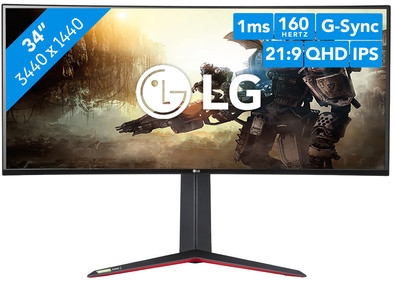
Never available again
View alternatives in the sidebar
View alternatives in the sidebar
Product number | 862929 | |
|---|---|---|
Manufacturer code | 34GN850-B.AEU | |
Brand | LG | |
Warranty | 2 years | |
Processing of your defect | Via Coolblue |
Screen size | 34 inches | |
|---|---|---|
Recommended display resolution | 3440x1440 | |
Sharpness | Quad HD (1440p) | |
Aspect ratio | Ultrawide (21:9) | |
Refresh rate | 160 Hz | |
Response time | 1 ms | |
Panel type | IPS panel | |
Brightness | 400 cd/m2 | |
Local dimming | ||
HDR support | ||
Contrast ratio | 1000 | |
Touchscreen | ||
Type of HDR | DisplayHDR 400, HDR10 | |
Screen reflection | Anti-glare | |
Blue light filter | ||
Flicker-free technology | ||
Color space | DCI-P3 | |
Color depth | 1 billion colors (10-bit) | |
Adaptive Sync | ||
Type of adaptive sync | FreeSync 2, G-Sync Compatible | |
Resolution width | 3440 pixels | |
Resolution height | 1440 pixels | |
Anti-reflection type | Anti glare | |
Horizontal viewing angle | 178 ° |
Height | 46 cm | |
|---|---|---|
Width | 82 cm | |
Depth | 31 cm | |
Weight | 7,6 kg | |
Color | Black | |
Including stand | ||
Material | Metal | |
Cable management | ||
Appearance | Gaming | |
Curved |
Number of HDMI connectors | 2 | |
|---|---|---|
Number of Female HDMI type A 2.0 ports | 2 | |
Number of headphone jacks | 1 | |
Type of headphone connection | 3.5mm (TS) | |
Number of Female Standard DisplayPort 1.4 ports | 1 | |
Number of female standard USB-A ports | 2 | |
Female standard USB-A port version | 3.0 | |
Number of female 3.5mm TS Audio Jack ports | 1 | |
Type of USB port | Standard USB-A | |
Number of USB ports | 2 | |
Suitable for daisy chaining |
Included by default | DisplayPort cable, HDMI cable, USB cable | |
|---|---|---|
Not included by default | USB-C cable |
Adjustable in height | ||
|---|---|---|
Tiltable | ||
Pivotable stand | ||
Pivot function | ||
VESA mount option | ||
VESA mount | 100x100mm |
Energy label | G | |
|---|---|---|
Energy consumption standby | 0,3 W | |
Energy consumption active | 72 W | |
Energy consumption per 1000h | 36 kWh | |
Annual energy consumption | 52,56 kWh | |
Annual energy costs | 21,02 euros |
Built-in speakers | ||
|---|---|---|
Webcam | ||
Kensington lock | ||
Best tested |
Recommended for use | Gaming, Image editing and graphic design, Internet, email, and text processing, Photo editing, Video editing, Watching movies in Full HD |
|---|
anything for a smile
Sharpness | Quad HD (1440p) | |
|---|---|---|
Curved | ||
Aspect ratio | Ultrawide (21:9) | |
Refresh rate | 160 Hz | |
Response time | 1 ms | |
Panel type | IPS panel | |
Color depth | 1 billion colors (10-bit) | |
Built-in speakers |
According to our monitor expert
G-Sync synchronizes the frame rate of your video card with this monitor and prevents tearing and stuttering.
The monitor has HDR 400 support for even more beautiful colors and contrasts.
Thanks to a 1ms response time and 160Hz refresh rate, you experience extremely smooth images.
You need a large desk for this screen.
Immerse yourself in your favorite games with the LG UltraGear 34GN850 gaming monitor. The monitor refreshes 160 times per second, so you game with a very smooth image. Thanks to the 21:9 aspect ratio and 34-inch screen, you can see more of the playing field. This screen has a 3440x1440 resolution. This resolution is just as sharp as QHD, but it's wider. The 1ms response time prevents ghosting. You can set up G-Sync to synchronize the refresh rate and the number of fps that your video card produces. Tilt and adjust the monitor in height for a comfortable sitting posture while you game.
Note: for QHD gaming, you need a powerful video card like a NVIDIA GeForce RTX GPU or AMD Radeon RX 5000-series GPU, an Xbox One, Xbox Series X or S, or a PlayStation 5.
I've had this monitor for a few weeks now and I really like it. The monitor was delivered in a large, sturdy box. The installation is easy. Screw the stand to the base and click the screen on it. Due to the large stand, the screen does protrude far forward, so this can be a problem if you don't have a deep desk. Connecting the dp cable and the power connection is a bit more difficult, because all connections on the back are in the middle. With a large screen like this, that's quite difficult. The USB hub is also located here, so that does not invite you to frequently change USB equipment.
The screen is aimed at gamers in all its possibilities, but the screen does not look overly 'gamer'. Only a red ring on the back without RGB which is not disturbing. To get to the settings of the monitor, there is a small joystick in the middle below the screen. It is easy to operate and everything is easy and quick to find. The monitor was recognized immediately and GSYNC was turned on automatically. The gaming experience is very smooth. The image is very nice due to the IPS screen and the color range is impressive. I do think that HDR adds little. The screen cannot be very bright and because it is an IPS screen, the contrast is moderate. As a result, the HDR does not come out well. Furthermore, the HDR function ensures that the image goes out for two seconds when using the multimedia keys. I quickly turned this feature off.
All in all, I think this is an excellent screen for gaming. The overview is great, the image quality is very good and the gameplay is smooth due to the fast response time and the low input lag. This makes for a wonderful gaming experience. The position of the connections and the HDR problems are minor flaws that don't spoil the fun for me.
Fokke Zijlstra
1 July 2020
Automatically translated from Nederlands
Tried the LG 27GL850 for this, but exchanged it for this Ultrawide from LG because I still want a little more screen space (and prefer one screen than two screens). And. What. One. Difference! The 27LG850 is already a top product, but after using this Ultrawide for a few days, I don't want to go back! The price is on the high side, but you also get a lot in return. The high price is definitely worth buying this monitor if you are still in doubt!
This monitor is great out of the box, but playing with a number of settings yourself and adjusting it to personal preference makes the screen even more beautiful.
I immediately mounted the screen on the wall with a wall bracket. With the LG 27GL850 this was very easy, with the 34GN850 the wall bracket just didn't fit in the designated compartment on the back of the screen. Fortunately, the wall bracket clicked into place well during screwing, although this only just happened.
What strikes me most about this screen is the low IPS glow and backlight bleed. In the lower corners it is very limited visible, and you really have to look for it (depending on the viewing angle). Even at 100% brightness! With the LG 27GL850 this was clearly more present (but not disturbing either). However, this may vary by monitor.
This screen is a real winner for gaming! I was already used to the smooth images from the previous screen, but in combination with Ultrawide it is just a little extra experience in games! Response times are good, no problems with tearing/stuttering etc. due to G-sync among other things! I have a GeForce RTX 2060 myself, which I have to overclock a bit to get to 144 fps. In addition, I also have to scale down the quality settings in games to achieve this (generally on high and medium for some settings), but in the future there will certainly be a better video card to also be able to play on ultra settings on 144/ 160 fps! :-)
In short: I will never go back to 16:9, Ultrawide is super nice and this screen is (especially for gaming) the best on the market - especially for this price!
Mies
15 July 2020
Automatically translated from Nederlands
For a while I was looking for a new LG IPS monitor to replace my 27 inch LG IPS monitor. I preferred 1 ms response time, at least 144 Hz refresh rate and more overview in width, which I ended up with the LG 34GN850 ultrawide gaming monitor. After being in possession of this for a few days and having used it, I can say that I am very pleased with my choice. I can therefore recommend everyone who is looking for a monitor with an ideal width that is suitable for both high-end gaming and business use!
Andor van Koeveringe
3 December 2020
Automatically translated from Nederlands
