LG DualUp Ergo 28MQ780-B

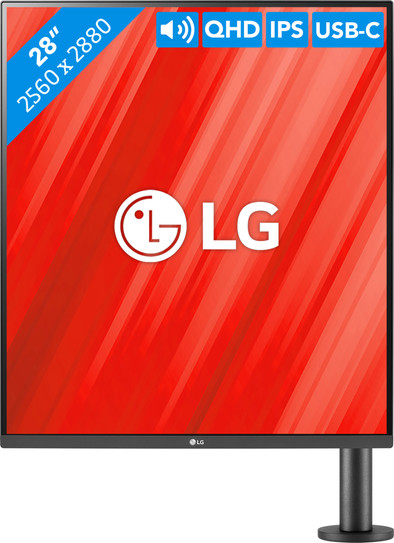
Never available again
View alternatives in the sidebar
View alternatives in the sidebar
Product number | 909114 | |
|---|---|---|
Manufacturer code | 28MQ780-B.AEU | |
Brand | LG | |
Warranty | 3 years | |
Processing of your defect | Via Coolblue |
Screen size | 27,6 inches | |
|---|---|---|
Sharpness | Quad HD (1440p) | |
Aspect ratio | Standard (16:18) | |
Refresh rate | 60 Hz | |
Response time | 5 ms | |
Panel type | IPS panel | |
Brightness | 300 cd/m2 | |
Local dimming | ||
HDR support | ||
Contrast ratio | 1000 | |
Touchscreen | ||
Type of HDR | HDR10 | |
Screen reflection | Anti-glare | |
Blue light filter | ||
Flicker-free technology | ||
Color space | DCI-P3 | |
Color depth | 1 billion colors (10-bit) | |
Adaptive Sync | ||
Resolution width | 2560 pixels | |
Resolution height | 2880 pixels | |
Anti-reflection type | Anti glare | |
Horizontal viewing angle | 178 ° |
Height | 84,3 cm | |
|---|---|---|
Width | 48,1 cm | |
Depth | 46,1 cm | |
Weight | 9 kg | |
Color | Black | |
Including stand | ||
Material | Metal, Plastic | |
Cable management | ||
Appearance | Business, Neutral | |
Curved |
Number of HDMI connectors | 2 | |
|---|---|---|
Number of Female HDMI type A 2.0a port | 2 | |
Number of headphone jacks | 1 | |
Type of headphone connection | 3.5mm (TRS) | |
Number of USB-C ports | 1 | |
Number of USB 2.0 Female USB-C ports | 1 | |
Number of Female Standard DisplayPort 1.4 ports | 1 | |
Number of female standard USB-A ports | 2 | |
Female standard USB-A port version | 3.0 | |
Number of female 3.5mm TRS Audio Jack ports | 1 | |
Number of female standard USB-B (3.0 form) ports | 1 | |
Type of USB port | Standard USB-A, Standard USB-B (3.0 form), USB-C | |
Number of USB ports | 4 | |
Type of USB cable included | USB-A to USB-B | |
USB-C dock | ||
Maximum USB-C dock power | 90 W |
Included by default | HDMI cable, USB cable, USB-C cable |
|---|
Adjustable in height | ||
|---|---|---|
Tiltable | ||
Pivotable stand | ||
Pivot function | ||
VESA mount option | ||
VESA mount | 100x100mm |
Energy label | G | |
|---|---|---|
Energy consumption standby | 0,5 W | |
Energy consumption active | 40 W | |
Energy consumption per 1000h | 30 kWh | |
Annual energy consumption | 43,8 kWh | |
Annual energy costs | 17,52 euros |
Built-in speakers | ||
|---|---|---|
Sound system | Stereo | |
Webcam | ||
Split screen | ||
Kensington lock |
Recommended for use | Image editing and graphic design, Internet, email, and text processing, Office work, Photo editing, Video editing, Watching movies in Full HD |
|---|
Sharpness | Quad HD (1440p) | |
|---|---|---|
Curved | ||
Aspect ratio | Standard (16:18) | |
Refresh rate | 60 Hz | |
Response time | 5 ms | |
Panel type | IPS panel | |
Color depth | 1 billion colors (10-bit) | |
Built-in speakers |
According to our monitor expert
With the ergonomically-adjustable monitor arm, you can always put the screen in the right position to prevent neck and back complaints.
Thanks to the combination of the QHD resolution, HDR10 support, and 95% coverage within the DCI-P3 color profile, you can enjoy sharp, lively, and bright images.
Connect and charge peripherals via the built-in USB-C port.
To mount this monitor, you need a desk with some space on the backside.
5 stars
33
4 stars
21
3 stars
1
2 stars
0
1 star
0
Installation ease
Image quality
Price-quality ratio
Design
I don't use the screen itself in the vertical orientation because I find it a bit too high, but with the ergonomic supplied arm the screen can be rotated 90 degrees. In this position it is perfect. It's a shame that more brands don't offer this format. An (almost) square screen is a dream for productive work! Very highly recommended!
Ruben Willems
14 November 2022
Automatically translated from Nederlands
What a relief for those big comparative Excels at my work! This screen has too many pluses for the list at the top. Why is this screen rarely bought or reviewed? This screen is one of the few that offers so much vertical space, useful for almost any professional use: data processing (super large Excels!), coding, writing and reviewing documents (full A4 and more), video editing, photo editing, CAD, social media and browsing/scrolling,... Everything just fits on this screen with the taskbars and all, plus P3 color depth. The screen installs easily on the included ergonomically adjustable arm that attaches to the back of the desk. The arm has a built-in cable duct and also a compartment for the supplied key that regulates the resistance of the arm. You can connect your PC via an included USB-C cable that also supplies the PC with power and gives access to the USB-A ports at the back for mouse and keyboard. But you can also connect two HDMI cables (one included) and a displayport. Killer feature: The screen allows itself to be virtually divided in two as two UHD screens above each other to show two inputs: two different PCs above each other, or the same PC with two screens. A shortcut key can switch between the modes (one high screen or two UHDs). Note: this can confuse a PC. There is an additional output for a USB cable to connect to a second PC and thus also use the keyboard and mouse for that PC when that respective input is selected (configurable). Unfortunately, the latter only works for the input shown at the top. The disadvantage of this screen is that the arm cannot be placed that low, so that it is probably better used ergonomically at a standing desk. The price of this screen is high compared to a single 4K screen, but you also get more: dual UHD IPS P3 screens, an ergonomic arm, USB-C dock and KVM switch in one. Add everything up and you quickly arrive at this price. For viewing widescreen films and for games that require horizontal vision (racers, first-person shooters) you better go for -strangely more popular- ultrawide screens, otherwise you can really improve your (work) life with an 'ultrahigh'. In addition to this LG, there are also regular 16:10 screens on the market that offer slightly more vertical space, but that is not much extra vertically.
Nils
7 September 2022
Automatically translated from Nederlands
Ideal if you are programming.
The special resolution of this screen is not recognized by Linux so it takes some fiddling to get it right.
Dirk
7 September 2022
Automatically translated from Nederlands
