i-tec Professional Dual 4K Docking Station 100W


anything for a smile
Plug and play; 2 screens connected to laptop without any problems via USB 3.0 or USB-C.
Marc
28 September 2026
Automatically translated from Nederlands
219,-
219,-
Product number | 942562 | |
|---|---|---|
Manufacturer code | CADUAL4KDOCKPD2 | |
Brand | I-tec | |
Warranty | 2 years | |
Processing of your defect | Via Coolblue |
Made for laptop models | Apple MacBook, Chromebook, Microsoft Surface, Windows laptop |
|---|
Laptop docking station suitable for | Connect 1 monitor, Connect 2 monitors and MacBook, Connect 2 monitors and a Windows laptop | |
|---|---|---|
Extra functionalities docking station | Charge laptop via docking station, Charge laptop via own charger, Charge phone via docking station, Connect headphones, Connect wired network | |
Type of main connector | USB-A, USB-C | |
Supported video technology on Docking Station | DisplayLink | |
Number of USB ports | 7 | |
USB function | Charge, Charging an external device, Data transfer, Device connection, Play media, Power source, Record audio, Software updates | |
Type of USB port | Standard USB-A, USB-C | |
Number of female standard USB-A ports | 5 | |
Female standard USB-A port version | 3.0, 3.1 | |
Power standard USB-A port | 7,5 W | |
Number of USB-C ports | 2 | |
Protocol Female USB-C port | USB, USB electricity | |
USB version Female USB-C port | 3.1 | |
Number of USB 3.1 Female USB-C port | 2 | |
Power USB-C port | 7,5 W | |
Fast charging USB-C port | ||
Total available video outputs | 2x DisplayPort, 2x HDMI | |
Number of HDMI connectors | 2 | |
Female HDMI Type A port version | 2.0 | |
Number of Ethernet ports | 1 | |
Ethernet speed | Gigabit Ethernet (1000Mbps) | |
Type of DisplayPort connector | standard DisplayPort | |
Number of Female Standard DisplayPort 1.4 ports | 2 | |
Version Female Standard DisplayPort port | 1.4 | |
Number of headphone jacks | 1 | |
Type of headphone connection | 3.5mm (TRRS) | |
Memory card reader | ||
Number of connectable monitors | 2 | |
Maximum image resolution 1 monitor | 5K (5120x2880) | |
Maximum refresh rate 1 monitor | 60 Hz | |
Maximum image resolution 2 monitors | 4K (3840x2160) | |
Maximum refresh rate of 2 monitors | 60 Hz |
Color | Black | |
|---|---|---|
Height | 3,7 cm | |
Width | 19 cm | |
Depth | 8,8 cm | |
Weight | 539 g |
Extra functionalities docking station | Charge laptop via docking station, Charge laptop via own charger, Charge phone via docking station, Connect headphones, Connect wired network | |
|---|---|---|
Type of main connector | USB-A, USB-C | |
Total available video outputs | 2x DisplayPort, 2x HDMI | |
Number of connectable monitors | 2 | |
Type of USB port | Standard USB-A, USB-C |
Note: the docking station works best if you install the DisplayLink driver before use. You can easily download this via the DisplayLink website.
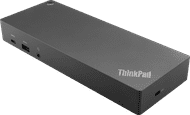
Complete your professional workplace with the i-tec Professional Dual 4K Docking Station 100W. You can connect up to 2 monitors via DisplayPort or HDMI to this dock. You also have enough USB-A and USB-C ports for all your peripherals, such as a mouse or keyboard. Isn't your wireless internet connection stable enough? Connect an Ethernet cable to this dock and you can use stable wired internet right away. With this dock, you can charge your laptop with a maximum 96W charging capacity. This way, you don't have to look for a socket while you work. You can also charge your smartphone with maximum 20W. You can mount this i-tec behind a monitor with a VESA mount, so you have a tidy workspace. You can use this docking station with all laptops and tablets with a USB-A or USB-C port. This is how you check if your laptop has a suitable USB-C port.
Connect 1 monitor, Connect 2 monitors and MacBook, Connect 2 monitors and a Windows laptop
Connect 1 monitor, Connect 2 monitors and MacBook, Connect 2 monitors and a Windows laptop
Connect 1 monitor, Connect 2 monitors and MacBook, Connect 2 monitors and a Windows laptop
Connect 1 monitor, Connect 2 monitors and MacBook, Connect 2 monitors and a Windows laptop
USB-A, USB-C
USB-A, USB-C
USB-A, USB-C
USB-A, USB-C
Charge laptop via docking station, Charge laptop via own charger, Charge phone via docking station, Connect headphones, Connect wired network
Charge laptop via docking station, Charge laptop via own charger, Charge phone via docking station, Connect headphones, Connect wired network
Charge laptop via docking station, Charge laptop via own charger, Connect headphones, Connect wired network
Charge laptop via docking station, Charge phone via docking station, Connect headphones, Connect wired network
2
3
3
2
According to our dock for laptops expert
With this dock, you can connect 2 extra 4K monitors to your laptop via DisplayPort or HDMI.
You can work with your accessories that you connect via the USB-A ports, such as a keyboard and an ergonomic mouse.
Via the Ethernet port, you can use stable wired internet.
Before you can use this docking station, you first have to install DisplayLink software.
Current product

219,-
217,-
204,-
184,-
Delivered tomorrow
Delivered tomorrow
Receive more coverage in case of damage than with your standard warranty. Coolblue takes care of everything: from taking out the insurance to repairs. Is a repair not possible? You receive the purchase price as CoolblueCredit.
XCover is allowed to arrange and process insurances on behalf of the insurer. The insurances are governed by Belgium law. If you have a complaint, you can contact the or our customer service.
First, add your dock for laptops to your shopping cart. On the next page, choose the Protection Plan below. You always have a 30-day return window and pay no deductible in case of damage.
The insurance can be canceled every year, even if you have paid in advance. If you cancel earlier, you will receive a refund for the overpaid amount.