

anything for a smile
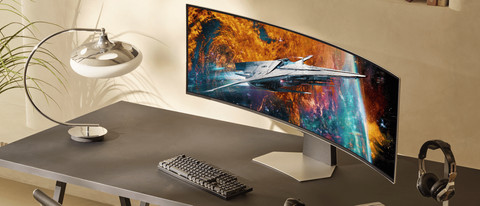
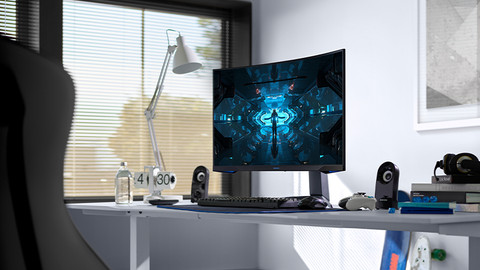
49 inches - Quad HD - 144Hz - OLED
849,-
Choose your monitor


Product number | 955947 | |
|---|---|---|
Manufacturer code | LS49DG912SUXEN | |
Brand | Samsung | |
Warranty | 2 years | |
Processing of your defect | Via Coolblue |
Screen size | 49 inches | |
|---|---|---|
Recommended display resolution | 5120x1440 | |
Sharpness | Quad HD (1440p) | |
Aspect ratio | Super ultrawide (32:9) | |
Refresh rate | 144 Hz | |
Response time | 0,03 ms | |
Panel type | OLED | |
Brightness | 250 cd/m2 | |
Local dimming | ||
HDR support | ||
Contrast ratio | 1000000 | |
Touchscreen | ||
Type of HDR | HDR10 | |
Screen reflection | Anti-glare | |
Blue light filter | ||
Flicker-free technology | ||
Color space | DCI-P3 | |
Color depth | 1 billion colors (10-bit) | |
Adaptive Sync | ||
Type of adaptive sync | Freesync Premium Pro | |
Resolution width | 5120 pixels | |
Resolution height | 1440 pixels | |
Anti-reflection type | Matte | |
Horizontal viewing angle | 178 ° |
Height | 52,9 cm | |
|---|---|---|
Width | 119,4 cm | |
Depth | 28,4 cm | |
Weight | 8,8 kg | |
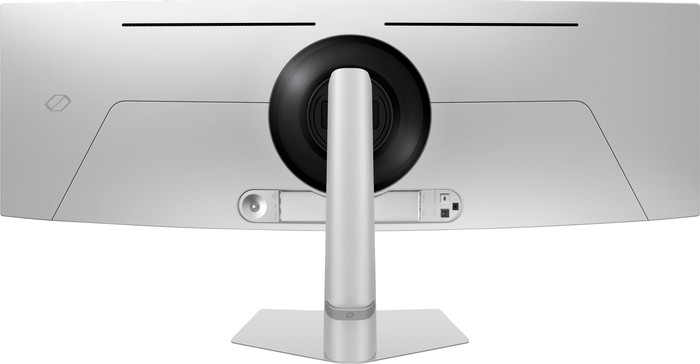
Color | Silver | |
Including stand | ||
Material | Metal, Plastic | |
Cable management | ||
Appearance | Gaming | |
Curved | ||
Screen curve | 1800 R |
Number of HDMI connectors | 2 | |
|---|---|---|
Number of Female HDMI type A 2.1 ports | 1 | |
Number of headphone jacks | 1 | |
Type of headphone connection | 3.5mm (TRS) | |
Number of USB-C ports | 3 | |
Number of Female Standard DisplayPort 1.4 ports | 1 | |
Number of female 3.5mm TRS Audio Jack ports | 1 | |
Number of Female RJ-45 ports | 0 | |
Type of USB port | USB-C | |
Number of USB ports | 3 | |
Suitable for daisy chaining | ||
USB-C dock |
Included by default | DisplayPort cable, USB cable | |
|---|---|---|
Not included by default | USB-C cable |
Adjustable in height | ||
|---|---|---|
Tiltable | ||
Pivotable stand | ||
Pivot function | ||
VESA mount option | ||
VESA mount | 100x100mm |
Energy label | G | |
|---|---|---|
Energy consumption standby | 0,5 W | |
Energy consumption active | 72 W | |
Energy consumption per 1000h | 49 kWh | |
Annual energy consumption | 71,54 kWh | |
Annual energy costs | 28,62 euros |
Built-in speakers | ||
|---|---|---|
Webcam | ||
Split screen | ||
Kensington lock |
Recommended for use | Gaming, Image editing and graphic design, Internet, email, and text processing, Photo editing, Video editing, Watching movies in Full HD |
|---|
Receive more coverage in case of damage than with your standard warranty. Coolblue takes care of everything: from taking out the insurance to repairs. Is a repair not possible? You receive the purchase price as CoolblueCredit.
XCover is allowed to arrange and process insurances on behalf of the insurer. The insurances are governed by Belgium law. If you have a complaint, you can contact the or our customer service.
First, add your monitor to your shopping cart. On the next page, choose the Protection Plan below. You always have a 30-day return window and pay no deductible in case of damage.
The insurance can be canceled every year, even if you have paid in advance. If you cancel earlier, you will receive a refund for the overpaid amount.

Installation ease
Image quality
Price-quality ratio
Design
I was looking for a 49" display to replace my two 27" screens. After a short search for a large screen without an exaggerated curve, I ended up with this monitor.
The OLED panel beautifully displays the colors and deep black tones. For gaming and productivity, this is a must in my opinion, also because of the software options.
With the PbP (Picture by Picture) mode it is possible to split the screen into 2 outputs. For example, you can connect an Xbox and your PC at the same time and display them each on one half of the screen. I also personally think Windows works better on 2 separate screens (tabs, mail, Teams, etc.) because you can easily make these applications full screen without it becoming very wide. By connecting both the DP and HDMI connections to your PC, you can simulate this. The monitor then works exactly as if it were two separate screens.
All in all, a must for anyone looking for a large screen without too much of a curve!
Pim
2 April 2025
Automatically translated from Nederlands
Something always breaks when we move, and unfortunately, this time it was my previous Samsung super ultrawide. So I had to look for a new monitor, which always comes with high expectations in this price range, so I didn't want to rush into a new one. After much deliberation, I went with this Samsung monitor, and I haven't regretted it yet!
I was a bit apprehensive about going with an OLED monitor, because burn-in is always a concern, but with the warranty and the fact that my previous monitor had survived for five years (even though it was a QLED, not an OLED), I wanted to put it to the test.
The screen is huge and well-packaged. The box is almost as big as my girlfriend (standing upright), so getting it to the right place was quite a challenge. Be sure to keep the box and the Styrofoam, because if you ever move, it's very difficult to find something with the right dimensions—I speak from experience.
The image quality is excellent, with no dead pixels, blacks, and good contrast. The maximum brightness of OLED is a bit of a problem, and this screen doesn't go extremely high. Even with the brightness set to 35/50 (I don't set it too high to avoid burn-in), this is a truly beautiful screen. The colors are fantastic when gaming, and it makes my previous screen look completely washed out.
I wanted to use my VESA mount, but installing it was a nightmare: the screws would barely fit into the holes, and it took me an hour to get it installed and the screws into the holes. Samsung really needs to rethink this mounting method, as this was a pain with my previous screen as well.
All in all, this is a beautiful screen, a nice upgrade from my previous one. Although I do miss an extra DisplayPort connection, I see little reason to complain: it's a beautiful screen, it does what it's supposed to do, and while the price is quite steep, I think it's more than worth it.
I would definitely buy it again.
Kevin
6 August 2025
Automatically translated from Nederlands
Great wide screen, beautiful image, a feast
Willemien
16 May 2025
Automatically translated from Nederlands
Our digital expert will help you, but it can sometimes make mistakes, like humans do.
According to our monitor expert
Sharp image: you can clearly see small details on the screen thanks to the Quad HD resolution.
See more at once: you can see more of your game and keep multiple windows open thanks to the 32:9 screen.
Smooth gaming: you can see fast action smoothly on screen thanks to the 144Hz refresh rate.
Not for consoles: super ultrawide monitors don't support consoles, so you'll see black bars on the sides of your screen.
DisplayPort required: you need a DisplayPort cable for 144Hz because HDMI doesn't support this speed.
849,-
Current product

144 Hz
240 Hz
240 Hz
240 Hz
240 Hz
Quad HD (1440p)
Quad HD (1440p)
4K (UHD)
4K (UHD)
4K (UHD)
OLED
OLED
QD-OLED
QD-OLED
OLED
5120x1440
5120x1440
3840x2160
3840x2160
3840x2160
849,-
829,-
849,-
899,-
900,-
Delivered tomorrow
Delivered tomorrow