Written by Steven
Edited on
23 August 2022
·
12:55
How do you choose an adjustable monitor?
If you work with a monitor all day, you don't want to develop any neck and back complaints. A 4K HDR monitor looks beautiful, but you can't really enjoy it if you're not comfortable. An adjustable monitor prevents these problems. You can tilt, rotate, and adjust the height for an ergonomic sitting posture. In this article, you can read how to choose an adjustable monitor.

Choose an adjustable monitor
A monitor can be adjusted in 3 ways. Each type of adjustability has its own advantage. In addition to these 3 ways, there are also 2 extra features.
- Height-adjustable: creates a comfortable sitting posture for every length and raises the screen to eye level.
- Tiltable: prevents glares and reflections.
- Rotatable base: for a 2-screen setup and presentations.
- Pivot function: switches the image to portrait mode for reading long texts or programming.
- VESA mount: to connect a monitor arm.
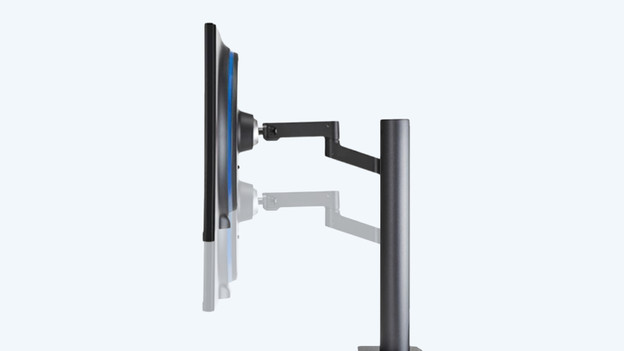
Height-adjustable
With a height-adjustable monitor, you can raise or lower the screen without moving the monitor base. That way, you can always position the screen at eye level. This will prevent neck and back complaints, because you're not continuously looking up or down. Are you buying the monitor for at the office? Your colleagues will also benefit from this feature. When they use the monitor, they can adjust the height to their liking. That makes a height-adjustable monitor ideal for shared workspaces.
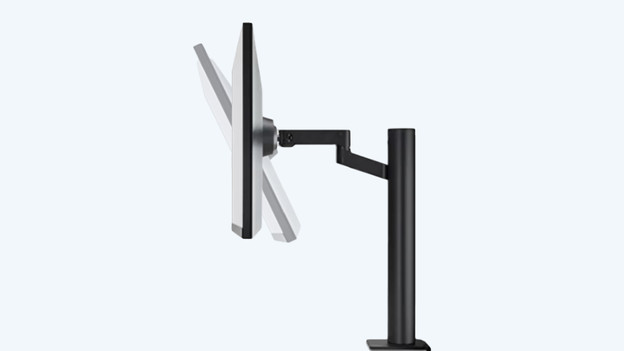
Tiltable screen
Do you often sit near the window? You'll probably be distracted by the reflection of the sun on your screen every now and then. A tiltable screen can be tilted up or down, so you correct the image angle and reduce reflections. A tiltable screen is also useful when you're too tall or too short for the monitor. If you can't move it to eye level, you can tilt the screen slightly for good visibility.

Rotatable base
A monitor with a rotatable base can be turned left and right without being moved. That's because the base is the part that gets rotated. This is especially useful if you often move around behind your desk or want to show the screen to other people. Do you use 2 screens? Rotate the base at an angle, so you create a curved effect. That way, you have a better and wider viewing angle while you work.

Pivot function (turn 90 degrees)
Monitors with a pivot function are useful if you often work with vertical files. For example, for programming, graphic design, or writing texts. Turn the screen 90 degrees to the left or right and the image will automatically rotate as well. That means the image switches to portrait mode. The image is now displayed vertically on your screen, so it looks like a digital A4 document.

VESA mount option
Unfortunately, not all monitors can be adjusted. Do you still want to rotate, tilt, or adjust them in height? Choose a VESA monitor arm or wall mount. The monitor will hover over your desk and take up less space. Make sure you check the VESA standard of your monitor. If it's 100x100mm for your monitor, the mount needs to match this.
Article by Steven
Monitor Expert.