Asus VivoBook Pro N580VD-E4392T-BE AZERTY
Never available again
View alternatives in the sidebar
View alternatives in the sidebar
Product number | 782559 | |
|---|---|---|
Manufacturer code | 90NB0FL1-M06290 | |
Brand | ASUS | |
Warranty | 2 years | |
Processing of your defect | Carry-in warranty |
Screen size | 15,6 inches | |
|---|---|---|
Touchscreen | ||
Panel type | IPS panel | |
Sharpness | Full HD (1080p) | |
Resolution width | 1920 pixels | |
Resolution height | 1080 pixels | |
Screen reflection | Anti-glare |
Processor | Intel Core i7 | |
|---|---|---|
Processor code name | Kaby Lake | |
Processor cores | Quad-Core (4) | |
Clock speed | 2,8 GHz | |
Turbo speed | 3,8 GHz | |
Cache memory | 6 MB |
Internal RAM | 16 GB | |
|---|---|---|
Memory composition | 1x 16GB | |
Maximum internal memory | 16 GB |
Total storage capacity | 1256 GB | |
|---|---|---|
Storage type | SSD + HDD | |
SSD storage capacity | 256 GB | |
HDD storage capacity | 1000 GB | |
Hard drive type | 2.5 inches, M.2 |
Video card | NVIDIA GeForce GTX 1050 | |
|---|---|---|
Type of video card | Dedicated | |
Video card RAM | 2 GB |
Operating system | Windows | |
|---|---|---|
Windows OS version | Windows 10 Home | |
Operating system language | Dutch, English, French, Multiple languages can be configured |
Laptop model | Laptop | |
|---|---|---|
Color | Gold | |
Material | Metal, Plastic | |
Metal type | Aluminum | |
Height | 1,92 cm | |
Width | 38 cm | |
Depth | 25,6 cm | |
Weight | 2,3 kg |
Mobile data connection | No | |
|---|---|---|
WiFi standards | Wireless AC | |
Bluetooth | ||
Bluetooth version | 4.2 |
USB port | ||
|---|---|---|
Number of USB ports | 4 | |
Protocol Female USB-C port | USB | |
USB version Female USB-C port | 3.0 | |
Number of female standard USB-A ports | 3 | |
Female standard USB-A port version | 2.0, 3.0 | |
Number of USB 3.0 Female USB-C ports | 1 | |
Number of USB 3.1 Female USB-C port | 0 | |
HDMI connector | ||
DisplayPort connector | ||
VGA connector | ||
Network connector | ||
Thunderbolt connector | ||
Headphone jack | ||
Memory card reader |
Keyboard layout | AZERTY | |
|---|---|---|
Physical keyboard layout | ANSI | |
Numeric keypad | ||
Spill-resistant | ||
Backlit keyboard | ||
Mechanical keyboard | ||
Programmable keys |
Built-in microphone | ||
|---|---|---|
Number of speakers | 2 | |
Sound reproduction | Stereo | |
Integrated computer speakers brand | Standard speakers |
Built-in camera | ||
|---|---|---|
Image definition webcams | HD Ready (720p) |
Battery technology | Lithium-ion | |
|---|---|---|
Power connector input type (female) | Other brand/product specific |
TPM (Trusted platform module) | ||
|---|---|---|
Kensington lock | ||
Windows Hello | ||
Fingerprint identity sensor |
anything for a smile
Screen size | 15,6 inches | |
|---|---|---|
Processor | Intel Core i7 | |
Internal RAM | 16 GB | |
Total storage capacity | 1256 GB | |
Video card | NVIDIA GeForce GTX 1050 | |
Panel type | IPS panel | |
Touchscreen | ||
Windows OS version | Windows 10 Home |
According to our laptop expert
Thanks to the NVIDIA GeForce GTX 1050 video card, you can render your videos faster and play games on this laptop.
With 16GB, this laptop has more RAM than other, similar models, so heavy tasks run faster.
The backlit keyboard means you'll make fewer typos while working in the dark.
Doesn't have a DVD player to play CDs and DVDs.
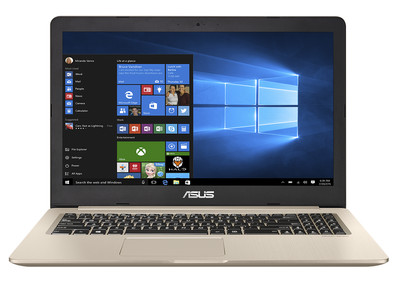
Get started on gaming and editing videos with the 15.6-inch Asus VivoBook N580VD-E4392T laptop. The NVIDIA GeForce GTX 1050 video card takes care of the graphics performance, so you can play games like Minecraft and Overwatch. Rendering videos in programs like Premiere also goes smoothly. Running a demanding calculation while editing photos? That's no problem, thanks to the 16GB of RAM, which easily lets you run several programs in the background. The sturdy aluminum casing features a backlit keyboard, so you can also see what you're typing in the dark. Long booting times are a thing of the past, thanks to the 256GB SSD, which boots the VivoBook in about 15 seconds.
Note: a laptop with an i5 or i7 processor and a thin casing can make more noise than similar laptops with a less powerful processor.
I recently got my hands on this Asus Vivobook Pro and so far I am very satisfied! A few brief insights into this laptop before you buy it:
As the name (Pro) and the price suggest, this is a laptop that must be able to handle a lot and be well finished. And that's right!
-Design: Great in my opinion, thanks in part to the choice of materials. It is thin considering the hardware present and does not resemble the average gaming laptop, which makes it very professional compared to similar laptops in this price range. Everything (ports, touchpad, etc.) is also well and tightly concealed in the aluminum housing
-Choice of material: The Vivobook Pro is mainly made of aluminum with a brushed feeling/look. This makes it look elegant and above all not cheap. However, you will still find plastic in 2 places: At the bottom of the laptop (so that you can easily unscrew it if desired. And around the screen (the bezels as they are called). I would rather not have seen this around the screen, but it doesn't bother me and is quite well finished.
-Screen: There is not much to criticize here, it is a FullHD screen with clear colors, good contrast and the brightness can be adjusted well. In full sunlight on a very summery day, as with all devices, you may not see much. But it's a matte screen so it doesn't shine when light comes in from a certain angle, which is definitely a positive!
-Hardware: As you can see in the specifications, this laptop is well equipped in terms of hardware. The processor is very fast, it performs tasks smoothly and I haven't noticed any slowdown yet. You will also have more than enough of the RAM of 16GB. The graphics card (GTX1050) surprised me positively. It can effortlessly handle graphics-heavy games without me having to lower the resolution to still play on high or ultra settings. However, the laptop does get warm and the double cooling will blow hard. While the latter may seem disturbing given the noise it makes, it also means your laptop won't overheat and have a longer lifespan. Finally, you will not quickly run out of storage memory, the 256GB SSD is more than enough for all your software and the 1TB HDD then remains completely for all your files (photos, video, music,...).
-Keyboard: The keyboard captures your strokes smoothly and pleasantly. However, you do notice that some things are placed close together. For example, the arrow keys are rather narrow in my opinion, but on the other hand it didn't really give me any problems. This went well. There is also keyboard lighting and it can be turned off or in 3 different brightness settings and this is quite a nice feature!
-Connectivity: Bluetooth and WiFi are available. the wifi module seems to support the new AC for faster connections. In a test to download a file of a few GB's, I easily got 6 - 7.5 MB/s. That's in my opinion for indoor wireless at a reasonable distance from the router.
-Sound: I was very surprised by this. Given the sound quality that most laptops have to offer, I wasn't expecting much. However, it is extremely clear sound, with good bass and at the same time clear reproduction of background noise. The laptop can also play quite loudly without experiencing sound disturbances or sounding unnatural. Harman Kardon... Yes, those are good speakers!
-Portable: Thanks to the size of 15.6inch, it is not very small but also not very big like 17.3inch. That, together with the fact that it is quite thin considering the hardware for the power performance it has to deliver, makes it elegant but above all portable. In terms of weight, it is not the lightest, but again, considering the hardware, it is not really heavy either, I had estimated it to be heavier but you can lift it easily with one hand and it will certainly not weigh too much in your backpack / school bag.
-Webcam: A pretty standard 720p webcam. Not overly sharp but he does his job for skype conversations. Very handy is an indicator light next to it that turns on as soon as the webcam is active, so you no longer have to place a sticker if you are afraid that hackers can watch.
Okay, on to the lesser points then?
-Cons: In itself I am very satisfied and impressed with the Asus Vivobook Pro, but as everywhere there is always room for improvement! In my opinion, for example, there are no indicators/lights that indicate whether capslock and numlock are on/off. Functionally, that's not a hindrance, but it would be handy if it was there. In addition, something that you can hardly avoid nowadays, the manufacturer still supplies a lot of bloatware. That is software from the manufacturer and third parties/partners that comes pre-installed but that you do not need. I immediately removed this when configuring my laptop as I prefer a clean windows installation without software that will play tricks on performance. Finally, I almost expected a fingerprint sensor to register you, given the Coolblue photos seem to suggest this. That is not there, I saw that on the last in the specifications.
Arne Ameye
31 August 2017
Automatically translated from Nederlands
Compact design and solid laptop.
Bart Vanfraechem
2 December 2017
Automatically translated from Nederlands
This Asus is a great laptop. Starts up quickly and has more than enough storage space. Also has a nice screen, a nice design, a solid finish. The listed negatives are really banal, such as the absence of an indicator light for shift- and num-lock, or the absence of an fn-lock option. Top machine.
DavidD
1 June 2018
Automatically translated from Nederlands