MSI GF63 Thin 10SCSR-1459NL
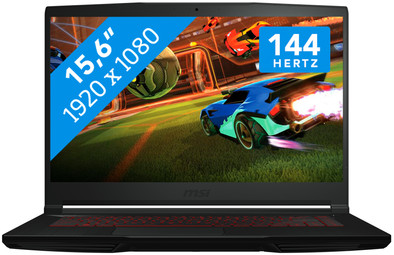
Never available again
View alternatives in the sidebar
View alternatives in the sidebar
If you purchase of a laptop or desktop, you receive 1 year of Norton 360 Deluxe for free. One day after purchase, you'll receive an email with a personal voucher code. Go to the promotional Terms and Conditions for more information.

Product number | 875233 | |
|---|---|---|
Manufacturer code | 9S7-16R412-1459 | |
Brand | MSI | |
Warranty | 2 years | |
Processing of your defect | Via Coolblue |
Screen size | 15,6 inches | |
|---|---|---|
Touchscreen | ||
Panel type | IPS panel | |
Sharpness | Full HD (1080p) | |
Resolution width | 1920 pixels | |
Resolution height | 1080 pixels | |
Refresh rate | 144 Hz | |
Screen reflection | Anti-glare | |
Adaptive Sync |
Processor | Intel Core i7 | |
|---|---|---|
Processor code name | Comet Lake | |
Processor cores | Hexa-Core (6) | |
Clock speed | 2,6 GHz | |
Turbo speed | 5 GHz | |
Cache memory | 12 MB |
Internal RAM | 16 GB | |
|---|---|---|
Memory composition | 2x 8GB | |
Memory slot 1 | 8 GB | |
Memory slot 2 | 8 GB | |
Total number of RAM slots | 2 |
Total storage capacity | 512 GB | |
|---|---|---|
Storage type | SSD | |
SSD storage capacity | 512 GB | |
Hard drive type | NVMe, PCIe |
Video card | NVIDIA GeForce GTX 1650 TI MAX-Q | |
|---|---|---|
Type of video card | Dedicated | |
Video card RAM | 4 GB |
Operating system | Windows | |
|---|---|---|
Windows OS version | Windows 10 Home | |
Operating system language | Multiple languages can be configured |
Laptop model | Laptop | |
|---|---|---|
Color | Black | |
Material | Plastic | |
Height | 2,17 cm | |
Width | 35,9 cm | |
Depth | 25,4 cm | |
Weight | 1,86 kg |
Mobile data connection | No | |
|---|---|---|
WiFi standards | Wireless AX | |
Bluetooth | ||
Bluetooth version | 5.0 |
USB port | ||
|---|---|---|
Number of USB ports | 4 | |
Type of USB port | Standard USB-A, USB-C | |
Protocol Female USB-C port | USB | |
USB version Female USB-C port | 3.2 | |
Number of female standard USB-A ports | 3 | |
Female standard USB-A port version | 3.2 | |
HDMI connector | ||
Number of HDMI connectors | 1 | |
Female HDMI Type A port version | 2.0 | |
DisplayPort connector | ||
VGA connector | ||
Network connector | ||
Number of Ethernet ports | 1 | |
Thunderbolt connector | ||
Headphone jack | ||
Memory card reader |
Keyboard layout | QWERTY | |
|---|---|---|
Physical keyboard layout | ANSI | |
Numeric keypad | ||
Spill-resistant | ||
Backlit keyboard | ||
Mechanical keyboard | ||
Programmable keys |
Built-in microphone | ||
|---|---|---|
Number of speakers | 2 | |
Sound reproduction | Stereo | |
Integrated computer speakers brand | Standard speakers |
Built-in camera | ||
|---|---|---|
Image definition webcams | HD Ready (720p) |
Battery technology | Lithium polymer | |
|---|---|---|
Power connector input type (female) | Other brand/product specific |
Manufacturer's warranty |
|---|
TPM (Trusted platform module) | ||
|---|---|---|
Kensington lock | ||
Windows Hello | ||
Fingerprint identity sensor |
Extra installed software |
|---|
anything for a smile
Screen size | 15,6 inches | |
|---|---|---|
Processor | Intel Core i7 | |
Internal RAM | 16 GB | |
Total storage capacity | 512 GB | |
Video card | NVIDIA GeForce GTX 1650 TI MAX-Q | |
Panel type | IPS panel | |
Touchscreen | ||
Windows OS version | Windows 10 Home |
According to our laptop expert
Thanks to the NVIDIA GeForce GTX 1650 Ti video card, you can play games like Fortnite at the highest settings.
The 144Hz screen smoothly displays fast-moving images, which is useful for fast-paced shooters.
With an Intel Core i7 processor and 16GB RAM, you can multitask with demanding programs such as Photoshop or stream your gameplay to Twitch.
Always connect the charger while gaming, or the performance won't be as good and the battery will run out within a couple of hours.
This laptop produces noise during intensive tasks like gaming.
On the MSI GF63 Thin 10SCSR-1459NL, you can play online multiplayer games like Fortnite. The NVIDIA GeForce GTX 1650 Ti Max-Q video card in this laptop is powerful enough for that. The screen has a refresh rate of 144Hz, so you see up to 144Hz frames per second appear on the screen. This comes in handy during fast shooters, where reacting 1 frame faster can make all the difference. With a weight of 1.86kg, this MSI is very light for a gaming laptop. That means you can take it with you to friends and game together. Thanks to the Intel Core i7 processor and 16GB RAM, you can do more than just gaming. You can edit photos in Photoshop or videos is Adobe Premiere Pro. In addition, you can stream your gameplay directly to Twitch while you play. Do you game deep into the night? Turn on the red keyboard lighting and continue to play.
Wondering whether the GTX 1650 Ti video card in this laptop can run your favorite game at high settings (60 fps)? Check the list below to see if this laptop meets the recommended system requirements:
Receive an email with a personal voucher code for 1 free year of Norton 360 Deluxe antivirus one day after purchase.
great laptop! Due to the strong processor and video card and price, this laptop is the best! I have a lot of fun with it so definitely recommended, gta 5 best settings 70 fps and fortnite 200 + and rocket league constant 250 fps so super
Marco van der Stok
4 April 2021
Automatically translated from Nederlands
I was looking for a laptop to mainly edit videos and maybe play some games. I found the right laptop for that.
Mike
16 April 2021
Automatically translated from Nederlands
I've had my laptop for 2 weeks now, it's fast if you're looking for something on the internet, it doesn't feel heavy, it's easy to take with you.. Produces a lot of noise when gaming, which is also mentioned in the description. Only the battery runs out very quickly, especially after an hour you have to charge it again, but it is quickly charged again.
I have made my keyboard less sharp so that the battery lasts a little longer if you press keyboard FN + PGDN (FN button below PGDN is to the right of your keyboard) can turn your keyboard a little less bright or turn it off and if you press FN + PGUP you turn the keyboard on / sharper again.. I put everything on dark mode to save battery.
Patricia Havenaar
9 July 2021
Automatically translated from Nederlands