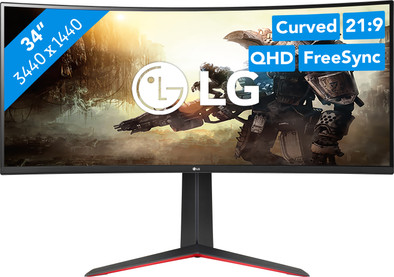
LG UltraGear 34GP63AP-B

Never available again
View alternatives in the sidebar
View alternatives in the sidebar
Product number | 927065 | |
|---|---|---|
Manufacturer code | 34GP63AP-B.AEU | |
Brand | LG | |
Warranty | 2 years | |
Processing of your defect | Via Coolblue |
Screen size | 34 inches | |
|---|---|---|
Recommended display resolution | 3440x1440 | |
Sharpness | Quad HD (1440p) | |
Aspect ratio | Ultrawide (21:9) | |
Refresh rate | 160 Hz | |
Response time | 1 ms | |
Panel type | VA panel | |
Brightness | 300 cd/m2 | |
Local dimming | ||
HDR support | ||
Contrast ratio | 3000 | |
Touchscreen | ||
Type of HDR | HDR10 | |
Screen reflection | Anti-glare | |
Blue light filter | ||
Flicker-free technology | ||
Color space | sRGB | |
sRGB color coverage percentage | 99 % | |
Color depth | 17 million colors (8-bit) | |
Adaptive Sync | ||
Type of adaptive sync | FreeSync Premium, G-Sync Compatible | |
Resolution width | 3440 pixels | |
Resolution height | 1440 pixels | |
Anti-reflection type | Anti glare | |
Horizontal viewing angle | 178 ° |
Height | 46,29 cm | |
|---|---|---|
Width | 80,9 cm | |
Depth | 2,12 cm | |
Weight | 5,8 kg | |
Color | Multicolored | |
Including stand | ||
Material | Plastic | |
Cable management | ||
Appearance | Gaming | |
Curved | ||
Screen curve | 1900 R |
Number of HDMI connectors | 2 | |
|---|---|---|
Number of Female HDMI type A 2.0 ports | 2 | |
Number of headphone jacks | 1 | |
Type of headphone connection | 3.5mm (TRS) | |
Number of Female Standard DisplayPort 1.4 ports | 1 | |
Number of female 3.5mm TRS Audio Jack ports | 1 | |
Suitable for daisy chaining | ||
USB-C dock |
Included by default | DisplayPort cable, HDMI cable | |
|---|---|---|
Not included by default | USB-C cable |
Adjustable in height | ||
|---|---|---|
Tiltable | ||
Pivotable stand | ||
Pivot function | ||
VESA mount option | ||
VESA mount | 100x100mm |
Energy label | G | |
|---|---|---|
Energy consumption standby | 0,3 W | |
Energy consumption active | 42 W | |
Energy consumption per 1000h | 32 kWh | |
Annual energy consumption | 46,72 kWh | |
Annual energy costs | 18,69 euros |
Built-in speakers | ||
|---|---|---|
Sound system | Stereo | |
Split screen | ||
Kensington lock |
Recommended for use | Gaming, Image editing and graphic design, Internet, email, and text processing, Photo editing, Watching movies in Full HD |
|---|
anything for a smile
Sharpness | Quad HD (1440p) | |
|---|---|---|
Curved | ||
Aspect ratio | Ultrawide (21:9) | |
Refresh rate | 160 Hz | |
Response time | 1 ms | |
Panel type | VA panel | |
Color depth | 17 million colors (8-bit) | |
Built-in speakers |
According to our monitor expert
Enjoy razor-sharp images and colors thanks to the WQHD resolution and HDR10 support.
Thanks to the 160Hz refresh rate and 1ms response time, you can enjoy very smooth images while gaming.
You can enjoy games and movies in an immersive way thanks to the curved screen.
Console games don't support ultrawide settings, so this isn't possible.
An ultrawide monitor takes up a lot of room, so make sure your desk is large enough.
Get started in top gear with your online games on the LG UltraGear 34GP63AP-B 34 inches UltraWide 160Hz QHD gaming monitor. The 160Hz refresh rate and 1ms response time allow you to game with smooth images. You can also enjoy sharp images because of the QHD resolution, which is almost twice as sharp as Full HD. As a result, you'll see everything sharp and you won't miss a single detail of your games. The ultrawide screen allows you to see more of the playing field. Adjust the field of view and enjoy a large overview in your open world games or shooters. The curved screen makes this even better, because it allows you to experience your games in an even intenser way. The monitor curves around your field of vision, which makes it seem like you're in the middle of the game. We recommend to enable first person view and get onto an airplane. It'll seem like you're actually flying to the horizon of your game. Do you game with a video card? No worries, the monitor has FreeSync Premium. This allows you to synchronize an AMD video card and prevent stutters and slowing down while gaming, even if you enabled HDR. With these HDR10 colors, you can enjoy extra vibrant images on your screen. The game world will feel extra realistic as a result. And in addition, you can tilt, rotate, or adjust the monitor in height to adapt an ergonomic posture. That way, you prevent neck and back complaints after a long gaming session.
Note: you need a very powerful video card for WQHD gaming, like an NVIDIA GeForce RTX 3070 Ti or AMD Radeon RX 6000 series GPU.
5 stars
5
4 stars
3
3 stars
3
2 stars
0
1 star
0
Unfortunately, I had to exchange this LG UltraGear 34GP63AP-B for a competing monitor with, at the moment, the same price: iiyama G-Master GB3467WQSU-B5. Coolblue's service is, as always, admirable and exemplary, for which we thank you!
Main reasons for exchange:
Mediocre image quality and low brightness (350 cd/m²)
The iiyama G-Master GB3467WQSU-B5 offers a brightness of 550 cd/m² and the image quality is slightly better than this LG, in this price range. Too bad, because LG (OLED) televisions, of course in a different price segment, are recommended in terms of image quality, at least if you are in a dark room.
If you don't need this extra brightness, then this is an excellent monitor with a beautiful design, which is also user-friendly to operate and will not dig too big a hole in your (electronic) portfolio.
Kevin
8 September 2023
Automatically translated from Nederlands
A great monitor for the money. Beautiful image and fine curvature. Only the monitor has quite a bit of ghosting. Not a problem of course if you don't mind this, but for FPS games this is very annoying. Of course a bit peculiar to a VA panel, but be warned.
Ruben
12 June 2023
Automatically translated from Nederlands
Super easy installation, beautiful bright colors and everything is adjustable.
Erik
13 August 2023
Automatically translated from Nederlands
