LG UltraWide 34WR50QC
Never available again
View alternatives in the sidebar
View alternatives in the sidebar
Product number | 932285 | |
|---|---|---|
Manufacturer code | 34WR50QC-B.AEU | |
Brand | LG | |
Warranty | 2 years | |
Processing of your defect | Via Coolblue |
Screen size | 34 inches | |
|---|---|---|
Recommended display resolution | 3440x1440 | |
Sharpness | Quad HD (1440p) | |
Aspect ratio | Ultrawide (21:9) | |
Refresh rate | 100 Hz | |
Response time | 5 ms | |
Panel type | VA panel | |
Brightness | 300 cd/m2 | |
Local dimming | ||
HDR support | ||
Contrast ratio | 3000 | |
Touchscreen | ||
Type of HDR | HDR10 | |
Screen reflection | Anti-glare | |
Blue light filter | ||
Flicker-free technology | ||
Color space | sRGB | |
sRGB color coverage percentage | 99 % | |
Color depth | Less than 17 million colors (less than 8-bit) | |
Adaptive Sync | ||
Type of adaptive sync | FreeSync | |
Resolution width | 3440 pixels | |
Resolution height | 1440 pixels | |
Anti-reflection type | Anti glare | |
Horizontal viewing angle | 178 ° |
Height | 35,9 cm | |
|---|---|---|
Width | 80,9 cm | |
Depth | 9,2 cm | |
Weight | 5,9 kg | |
Color | Black | |
Including stand | ||
Material | Plastic | |
Cable management | ||
Appearance | Business, Gaming, Neutral | |
Curved | ||
Screen curve | 1800 R |
Number of HDMI connectors | 2 | |
|---|---|---|
Number of Female HDMI type A 2.0 ports | 2 | |
Number of headphone jacks | 1 | |
Type of headphone connection | 3.5mm (TRS) | |
Number of Female Standard DisplayPort 1.4 ports | 1 | |
Number of female 3.5mm TRS Audio Jack ports | 1 | |
Suitable for daisy chaining | ||
USB-C dock |
Included by default | DisplayPort cable, HDMI cable | |
|---|---|---|
Not included by default | USB-C cable |
Adjustable in height | ||
|---|---|---|
Tiltable | ||
Pivotable stand | ||
Pivot function | ||
VESA mount option | ||
VESA mount | 100x100mm |
Energy label | F | |
|---|---|---|
Energy consumption standby | 0,5 W | |
Energy consumption active | 45 W | |
Energy consumption per 1000h | 31 kWh | |
Annual energy consumption | 45,26 kWh | |
Annual energy costs | 18,1 euros |
Built-in speakers | ||
|---|---|---|
Webcam | ||
Split screen | ||
Kensington lock |
Recommended for use | Gaming, Internet, email, and text processing, Office work, Photo editing, Video editing, Watching movies in Full HD |
|---|
Sharpness | Quad HD (1440p) | |
|---|---|---|
Curved | ||
Aspect ratio | Ultrawide (21:9) | |
Refresh rate | 100 Hz | |
Response time | 5 ms | |
Panel type | VA panel | |
Color depth | Less than 17 million colors (less than 8-bit) | |
Built-in speakers |
According to our monitor expert
With an ultrawide monitor, you can open many programs and windows side by side without switching tabs.
Enjoy sharp images and get started with photo editing with the QHD resolution, which is almost twice as sharp as Full HD.
You can see all your work in your field of view on the curved screen, so you work more ergonomically.
An ultrawide monitor takes up a lot of space, so make sure your desk is large enough.
Without a monitor arm, you can't adjust this monitor in height.
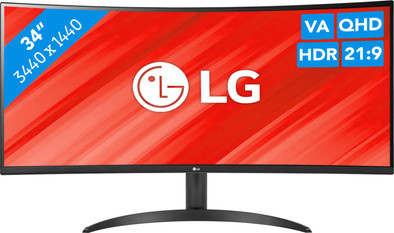
Enjoy a large overview during your work day with the LG UltraWide 34WR50QC 34-inch curved ultrawide QHD monitor. Thanks to the 34-inch screen, you have enough space to multitask and open multiple windows or programs side by side. Open a data analysis on the left and edit texts in Microsoft Word on the right, for example. Images are also almost twice as sharp as in Full HD, so you can zoom in on the details. This makes the screen suitable for photo editing in Adobe Photoshop as well. Thanks to the curved design, the screen curves around your field of view. This provides a unique viewing experience and also has ergonomic benefits. The screen is always in the middle, so you don't have to move your neck as much. Working with 2 devices at the same time? Turn on the PbP mode, which allows you to show the signal of 2 computers on the screen at the same time. Want to game when you're done with work? Thanks to the 100Hz refresh rate, this LG monitor is also suitable for gaming with smooth images. That way, you can effortlessly end your work day with a Fortnite match.
5 stars
30
4 stars
9
3 stars
0
2 stars
0
1 star
0
Installation ease
Image quality
Price-quality ratio
Design
If you want a widescreen monitor and do not have too many demands on it, this is a great option. Office work, emailing, surfing and watching YouTube, etc. If you place an IPS monitor next to it you will see a difference in image quality, but solo it is simply a great screen.
For photo/video editing or playing demanding games you really should buy an IPS screen
Mark
19 October 2023
Automatically translated from Nederlands
Nice product, we now have 22 of these screens in the office
Marc
25 January 2024
Automatically translated from Nederlands
Exactly what I needed, and a screen that allows you to work perfectly with two windows next to each other. And beautiful image!
Erik
27 August 2023
Automatically translated from Nederlands