According to our monitor expert
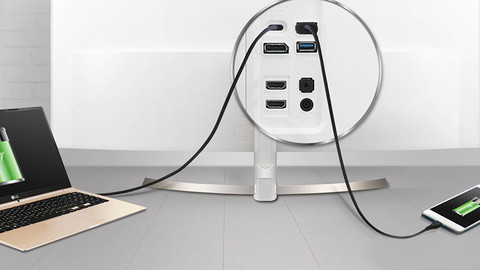
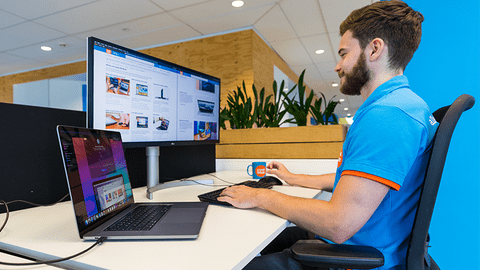
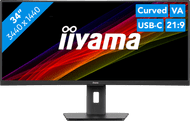
Perform your daily work with the iiyama ProLite XCB3497WQSNP-B1 34 inches Quad HD curved monitor. The KVM switch allows you to connect multiple devices to the screen. This way, you can connect 2 PCs to the monitor and switch between these systems with 1 button. You can work in multiple windows at the same time on the large ultrawide screen. The curved screen bends the monitor around your field of view, so you don't get neck pain after a long work day. In addition, you can see every detail clearly thanks to the Quad HD image quality. You can also tilt and rotate the screen to reduce reflections from the sun. The built-in speakers let you listen to your favorite music or podcasts while you work. You can power your laptop, transfer data, and transmit video signals with 1 cable through the built-in USB-C dock.
Sharpness | WQHD | |
Curved | ||
Aspect ratio | Ultrawide (21:9) | |
Refresh rate | 120 Hz | |
Response time | 0,4 ms | |
Panel type | VA panel | |
Color depth | Less than 17 million colors (less than 8-bit) | |
Built-in speakers |
5 stars
1
4 stars
2
3 stars
0
2 stars
0
1 star
0
Come from an older LG model. Also 34"curved. I have searched for a long time for another monitor and ended up with this monitor.
Well packaged, lots of cables included, easy to assemble. Has 3 USB-C ports, of which unfortunately only 1 can be used as input for video.
Out of the box the colors were bad. I tried to set something, but the colors are not as nice as on the LG. Only downside so far. Speed of the LAN port is fine. I get 300Mbs on the LG, on this monitor it is almost 1 Gbs. OSD also in Dutch
Jan Willem
6 May 2025
Automatically translated from Dutch
It takes some getting used to the curved screen, but after that, it's truly fantastic. So much space and, of course, much nicer than two separate monitors side by side. The advantage of this one is that you can connect two different laptops to it and switch between them, but also that, in addition to HDMI, you have a USB-C port for video, which also charges your laptop, even a heavy MacBook Pro.
I find the price for such a large screen very attractive. Of course, you do need desk space.
Tim
11 September 2025
Automatically translated from Dutch
Current product
Â
Â
Â
Â
352,-
401,-
296,-
330,-
516,-
Yes
No
No
No
Yes
Ultrawide (21:9)
Standard (16:9)
Standard (16:9)
Standard (16:9)
Ultrawide (21:9)
120 Hz
60 Hz
100 Hz
75 Hz
100 Hz
0,4 ms
5 ms
1 ms
5 ms
5 ms
Receive more coverage in case of damage than with your standard warranty. Coolblue takes care of everything: from taking out the insurance to repairs. Is a repair not possible? You receive the purchase price as CoolblueCredit.
XCover is allowed to arrange and process insurances on behalf of the insurer. The insurances are governed by Belgium law. If you have a complaint, you can contact the or our customer service.
First, add your monitor to your shopping cart. On the next page, choose the Protection Plan below. You always have a 30-day return window and pay no deductible in case of damage.
The insurance can be canceled every year, even if you have paid in advance. If you cancel earlier, you will receive a refund for the overpaid amount.
Product number | 964125 | |
Manufacturer code | XCB3497WQSNP-B1 | |
Brand | Iiyama | |
Warranty | 3 years | |
Processing of your defect | At your home |
Recommended display resolution | 3440x1440 | |
Sharpness | WQHD | |
Aspect ratio | Ultrawide (21:9) | |
Refresh rate | 120 Hz | |
Response time | 0,4 ms | |
Panel type | VA panel | |
Local dimming | ||
HDR support | ||
Contrast ratio | 3000 | |
Touchscreen | ||
Screen reflection | Anti-glare | |
Blue light filter | ||
Flicker-free technology | ||
Color space | sRGB | |
sRGB color coverage percentage | 99 % | |
Color depth | Less than 17 million colors (less than 8-bit) | |
Adaptive Sync | ||
Resolution width | 3440 pixels | |
Resolution height | 1440 pixels | |
Anti-reflection type | Matte | |
Horizontal viewing angle | 178 ° |
Height | 42,6 cm | |
Width | 80,7 cm | |
Depth | 24,5 cm | |
Weight | 9,7 kg | |
Color | Black | |
Including stand | ||
Material | Plastic | |
Cable management | ||
Appearance | Neutral | |
Curved | ||
Screen curve | 1500 R |
Number of HDMI connectors | 2 | |
Number of Female HDMI type A 1.4 ports | 1 | |
Number of Female HDMI type A 2.0 ports | 1 | |
Number of headphone jacks | 1 | |
Type of headphone connection | 3.5mm (TS) | |
Number of USB-C ports | 2 | |
Number of USB 3.0 Female USB-C ports | 2 | |
Number of Female Standard DisplayPort 1.4 ports | 1 | |
Number of female standard USB-A ports | 2 | |
Female standard USB-A port version | 3.1 | |
Number of female standard USB-B (3.0 form) ports | 1 | |
Number of Female RJ-45 ports | 1 | |
Number of female 3.5mm TS Audio Jack ports | 1 | |
Type of USB port | Standard USB-A, Standard USB-B (3.0 form), USB-C | |
Number of USB ports | 4 | |
Suitable for daisy chaining | ||
USB-C dock | ||
Maximum USB-C dock power | 7,5 W |
Included by default | DisplayPort cable, HDMI cable, USB cable, USB-C cable |
Adjustable in height | ||
Tiltable | ||
Pivotable stand | ||
Pivot function | ||
VESA mount option | ||
VESA mount | 100x100mm |
Energy label | F | |
Energy consumption standby | 0,5 W | |
Energy consumption active | 55 W | |
Energy consumption per 1000h | 32 kWh | |
Annual energy consumption | 46,7 kWh | |
Annual energy costs | 18,68 euros |
Built-in speakers | ||
Sound system | Stereo | |
Webcam | ||
Split screen | ||
Kensington lock |
Recommended for use | Internet, email, and text processing, Office work, Watching movies in Full HD |