Written by Tobias
Edited on
12 July 2024
·
14:23
How do you delete programs in Windows?
You want to delete a program in Windows, but you need some help. In this article, you'll find 3 tips to help you delete programs.

Delete programs in Windows
With these 3 tips, you can delete programs in Windows:
- Delete via search bar
- Delete via settings
- Delete via control panel
Tip 1: delete via search bar
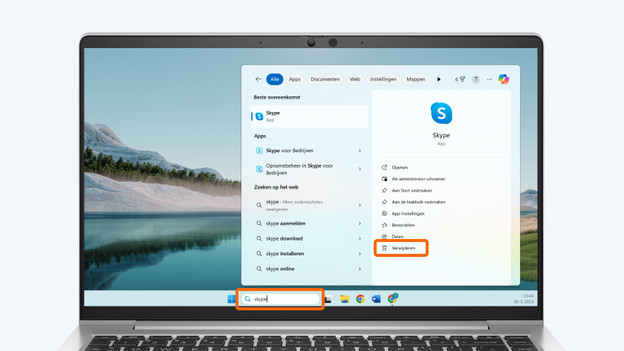
- Select the search bar at the bottom of your screen.
- Search for the program you want to delete.
- Various options will appear below the program. Choose Uninstall.
- Click Uninstall. The program will now be deleted.
Search for the program you want to delete.
Select delete.
Also select delete here.


Tip 2: delete via settings
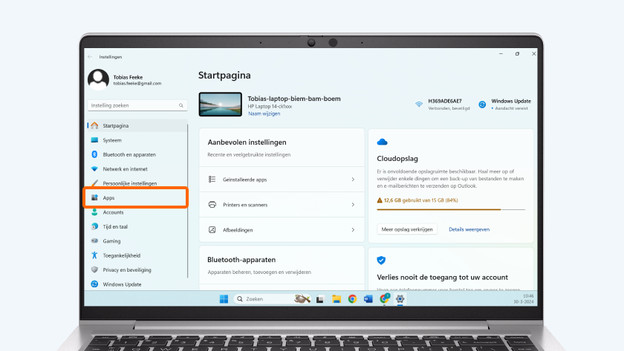
- Click on the Windows Start icon on the bottom-left of your screen.
- Go to Settings. You can recognize this by the gearwheel icon.
- Go to Apps.
- You'll now see a list of your programs if you have Windows 10. Go to the next step. You'll see the option Installed apps if you have Windows 11. Select this.
- In this overview, you can see all programs that are installed on your laptop or computer. Sort all programs by name, size, and installation date using the Sort by button. This makes programs easier to find.
- Select the 3 dots of the program you want to delete and click Uninstall. The program will now be deleted.
Select the Windows Start icon and go to settings.
Go to Apps.
Select Installed apps.
Sort using the Sort button.
Select the 3 dots and choose Uninstall.



Tip 3: delete via control panel
- Click on the search bar at the bottom of your screen.
- Type control panel and select the program Control panel.
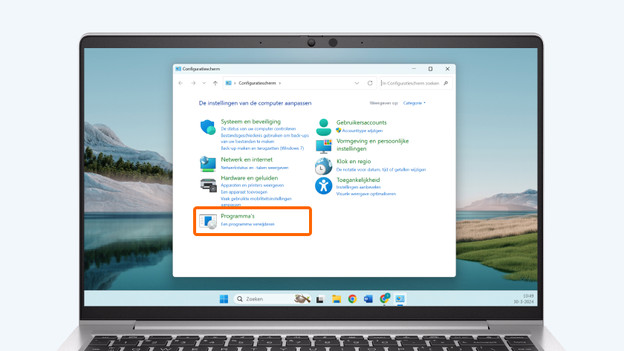
- You can now see the control panel. Choose the option Uninstall a program under the header Programs.
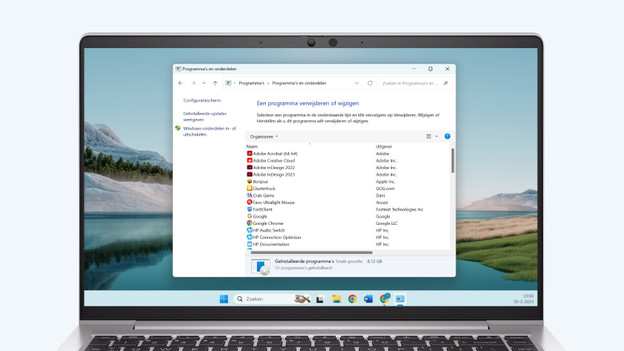
- Double-click the program you want to delete. The program will now be deleted.
Type control panel in the search bar.
Choose Uninstall a program under Programs
Double-click the program you want to delete.


Do you need more storage space?
In addition to programs, personal files like videos, music, photos, and documents take up a lot of space on a device. Delete some personal files to free up space. Would you rather not delete any files? Feel free to store your data on an external hard drive.
Article by Tobias
Laptop Expert.