

Coolblue's Choice Laptops with OLED screen
8 laptops
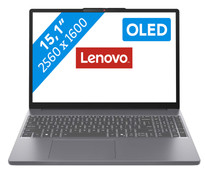

Our choice for a Windows laptop for professional photo editing
|
Windows Home
|
15,1 inches
|
Intel Core i5/Intel Core 5
- You can see all details of your photos sharply thanks to the WQXGA resolution.
- You can enjoy bright and vibrant colors thanks to the OLED panel.
- You can smoothly edit large photo files in apps like Adobe Photoshop and Lightroom.
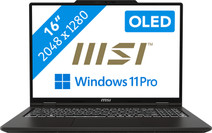
Our choice for a business laptop for video editing
|
Windows Pro
|
16 inches
|
Intel Core Ultra 9
- You work smoothly in demanding video editing programs thanks to the Intel Core Ultra 9 processor and 64GB DDR5 RAM.
- Thanks to the OLED panel, you can work with good color contrasts, so you can see more details between light and dark contrasts.
- Thanks to the 2TB storage space, you can easily store your large files locally on the laptop.
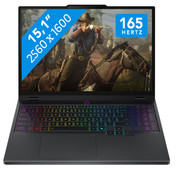
Our choice for a 15-inch gaming laptop that you can use to play demanding games
|
Windows Home
|
15,1 inches
|
AMD Ryzen AI 7
- You can smoothly play demanding games at 60 fps with the RTX 5070 video card, like Microsoft Flight Simulator and Elden Ring.
- Colors and graphics look extra realistic on the OLED panel, which makes your gaming experience even more detailed.
- In addition to gaming, you can stream in 4K and edit your gameplay videos thanks to the AMD Ryzen AI 7 processor and 32GB RAM.

Our choice for a 17-inch gaming laptop that you can use to play light games
|
Windows Home
|
15,1 inches
|
Intel Core i7/Intel Core 7
- You can play light games such as Fortnite, Call of Duty, and Minecraft thanks to the RTX 5060 and fast Intel Core 7 processor.
- You can enjoy fast-moving images and you won't be bothered by screen tearing on the large 17-inch 165Hz screen, which is useful in shooters and race games.
- In addition to gaming, you can stream in Full HD and edit your gameplay videos thanks to the Intel Core 7 processor and 32GB RAM.

Our choice for a Chromebook for your school or studies
|
Google ChromeOS
|
14 inches
|
16 GB
RAM
- You can smoothly switch between multiple apps, so you can write your reports while doing research via your browser.
- You can easily take this Chromebook with you and easily work offline, because you have a lot of local storage space.
- Colors look bright and lifelike on the screen thanks to the OLED panel.

Our choice for a Windows laptop for light video editing
|
Windows Home
|
16 inches
|
Intel Core i7/Intel Core 7
- You can see all colors and contrasts well on the OLED display with DisplayHDR 600 True Black.
- You can smoothly edit videos in programs like Adobe Premiere Pro.
- You can also continue working a bit on your videos at night, because you quickly see the right keys thanks to the backlit keyboard.

Our choice for a business laptop suitable for photo editing
|
Windows Pro
|
14 inches
|
Intel Core Ultra 7
- You can edit photos in programs such as Adobe Photoshop, InDesign, or Lightroom thanks to the Intel Core Ultra 7 processor and 32GB RAM.
- Thanks to the OLED panel, you can edit company photos with high color contrasts and deep black levels.
- Thanks to the Copilot+ support, you can reasily remove objects or people from your photos and smoothly switch between demanding programs.

Our choice for a Chromebook for on the go
|
Google ChromeOS
|
14 inches
|
12 GB
RAM
- You easily can take this Chromebook with you thanks to the low 1.1kg weight.
- You can also store files locally on this Chromebook thanks to the 128GB storage, so you can easily keep working online.
- With the OLED display, you can enjoy sharp images and realistic colors.
